We went through OurDream's builder twice, as a guest and on a Premium account, where we created Yuki, 23. Six screens, about six minutes, and the first five work before you even sign up.
 By Wren Ashby
Pick Anime on step 1, set ethnicity, face and body, write her details, then render her portrait for 5 coins. The 55 dreamcoins you get at sign-up cover the portrait and your first messages; on Premium, messages cost 0 coins.
OurDream's builder is the most complete of the five platforms we cover. In six screens you choose a drawing style, an ethnicity that can be fantasy (Elf, Alien, Demon), a face, a body, and then a full personality: voice, character traits, job, relationship to you, hobbies. The last screen renders her portrait in anime style and opens the chat.
This guide follows the builder screen by screen with the screenshot we took on each one, then explains what to do once she exists, gives three ready-to-copy recipes and lists the problems you might hit. Prices are in US dollars.
You do not need an account to begin: the first five steps work as a guest, and OurDream asks you to sign up only at the Image step. Signing up is free with Google or an email address, and asks for no card. The account starts with 55 dreamcoins.
Know what each part costs. The portrait at the end costs 5 coins. On a free account each chat message costs 1 coin; on Premium, messages cost nothing and coins only go to pictures, videos and calls. A free account can keep up to 10 characters.
Last, decide on the archetype before you click. A yandere, a tsundere or a kuudere comes mostly from the Details step, so it helps to know who she is before you choose her hair.
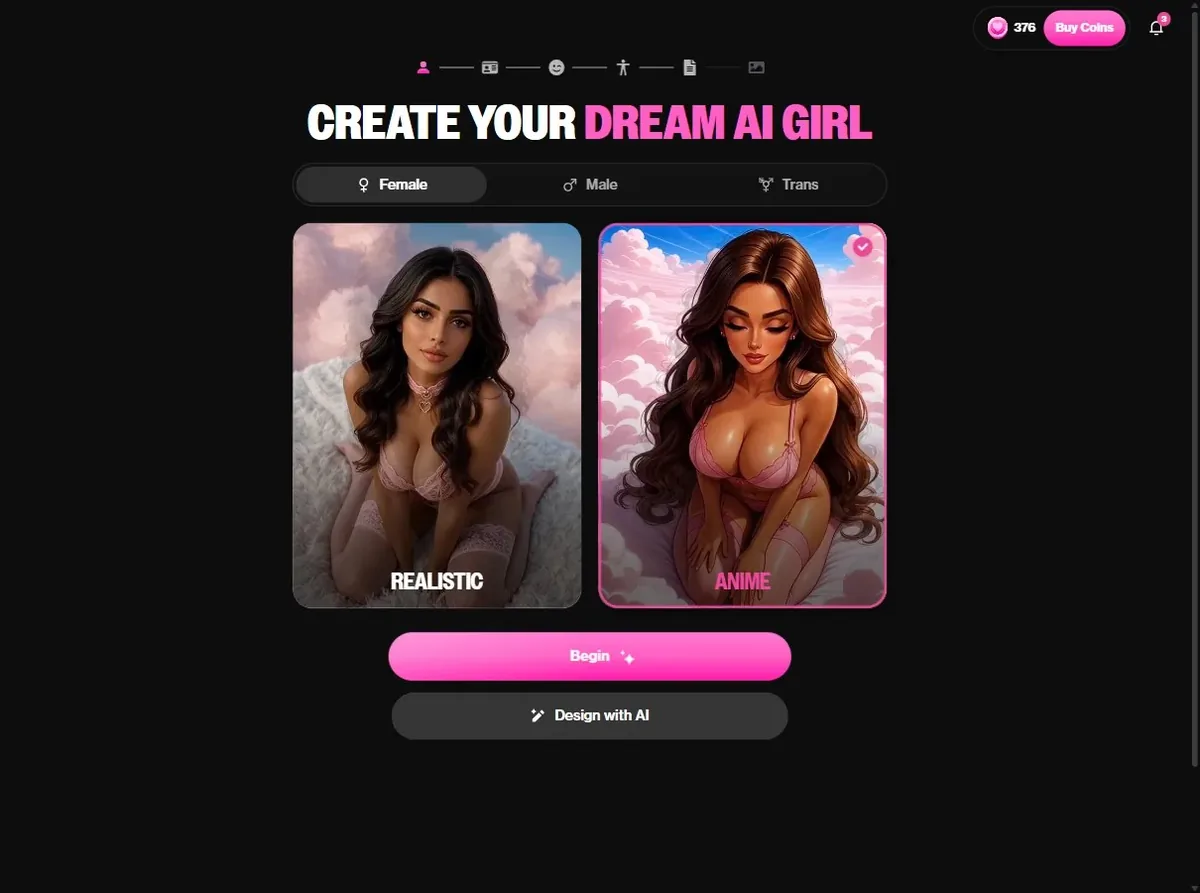
The builder opens on CREATE YOUR DREAM AI GIRL. At the top, choose Female, Male or Trans. Below, two large cards: Realistic and Anime. Click Anime; the card gets a pink frame and a check mark.
This is the most important click of the whole process. Every preview in the next screens follows this choice, so with Anime selected you see drawn faces and bodies, not photos with a filter. Then press Begin.
Tip: if you are torn between the two styles, open OurDream's anime page first and look at a few finished characters. They show what the Anime mode produces once a portrait is rendered.
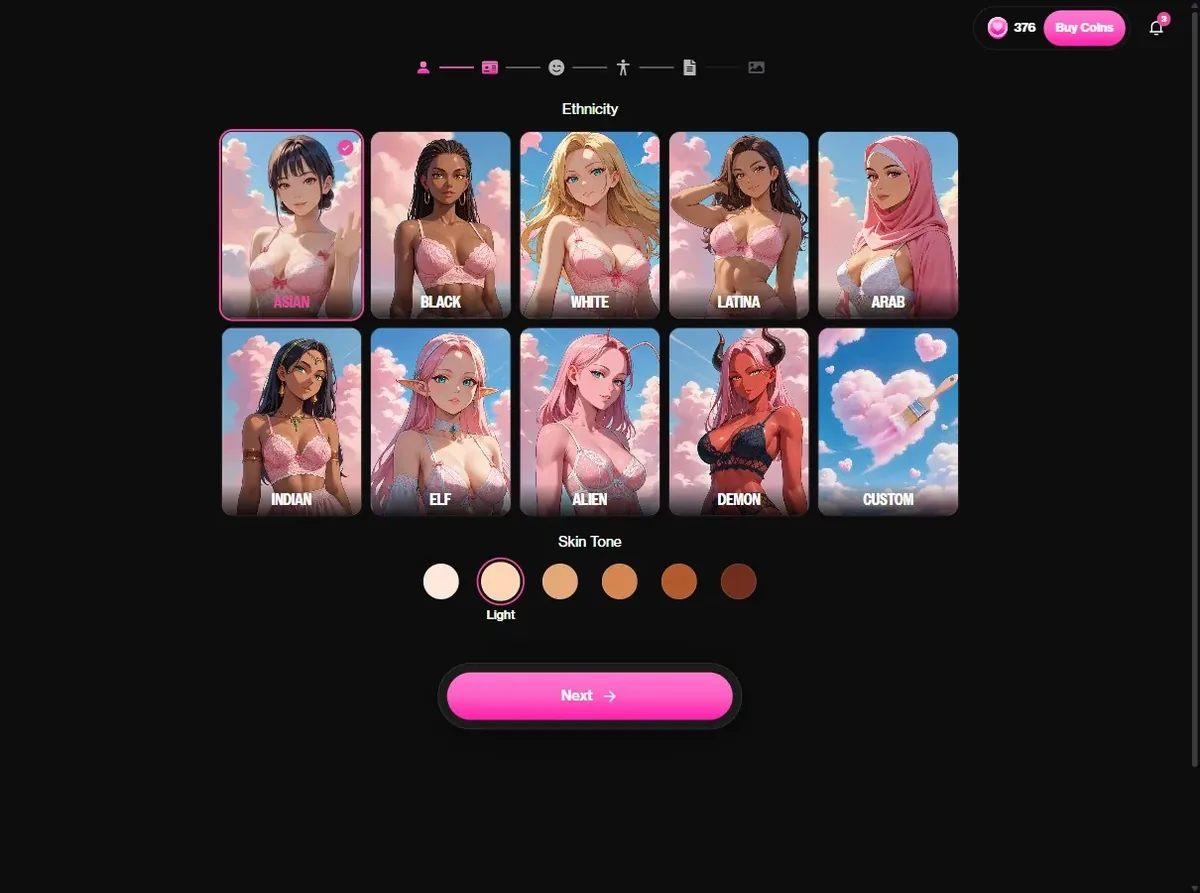
The General step shows ten drawn cards: Asian, Black, White, Latina, Arab, Indian, Elf, Alien, Demon and Custom. Below them, six skin tones from fair to darker. We picked Asian with a light tone for Yuki.
The three fantasy shortcuts are the reason many readers pick OurDream. Elf gives pointed ears and a fantasy look; Demon gives horns and a red or dark complexion; Alien gives antennae and pastel colors. Custom lets you describe anything else later, which is how you get a catgirl or a fox spirit.
Tip: for a vampire or a goth, stay on a human ethnicity with the fair tone; the dark look comes from hair and eyes on the next step.
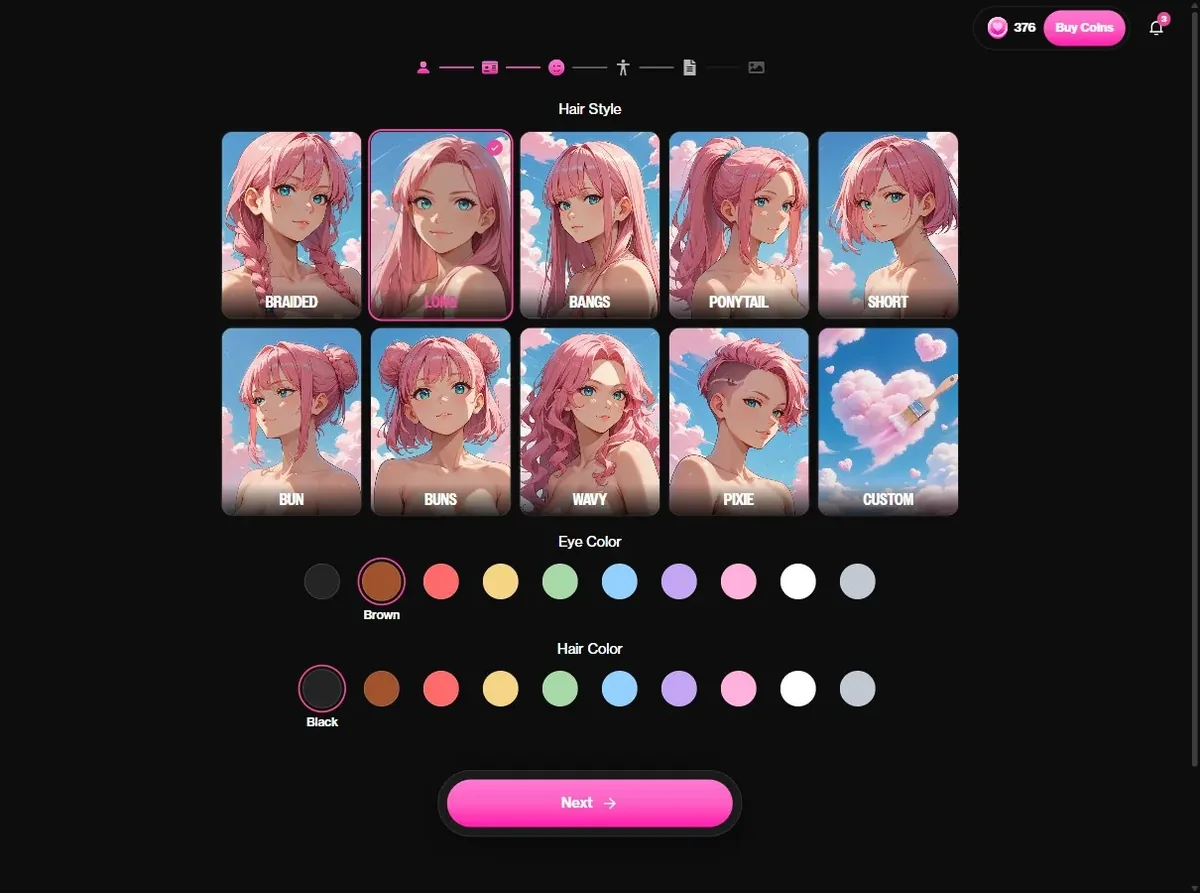
Face has three rows: hair style (Braided, Long, Bangs, Ponytail, Short, Bun, Buns, Wavy, Pixie, Custom), eye color and hair color, ten swatches each. The previews update so you can see the combination.
This is where archetypes start to show. Black hair and red eyes read goth or vampire in one glance. Silver hair and pale blue eyes suit a cool kuudere. Pink twin buns read playful; keep them for an adult character and give her a grown-up job on step five.
Tip: hair and eye colors are flat swatches. For gradients or two-tone hair, write it in the custom field.
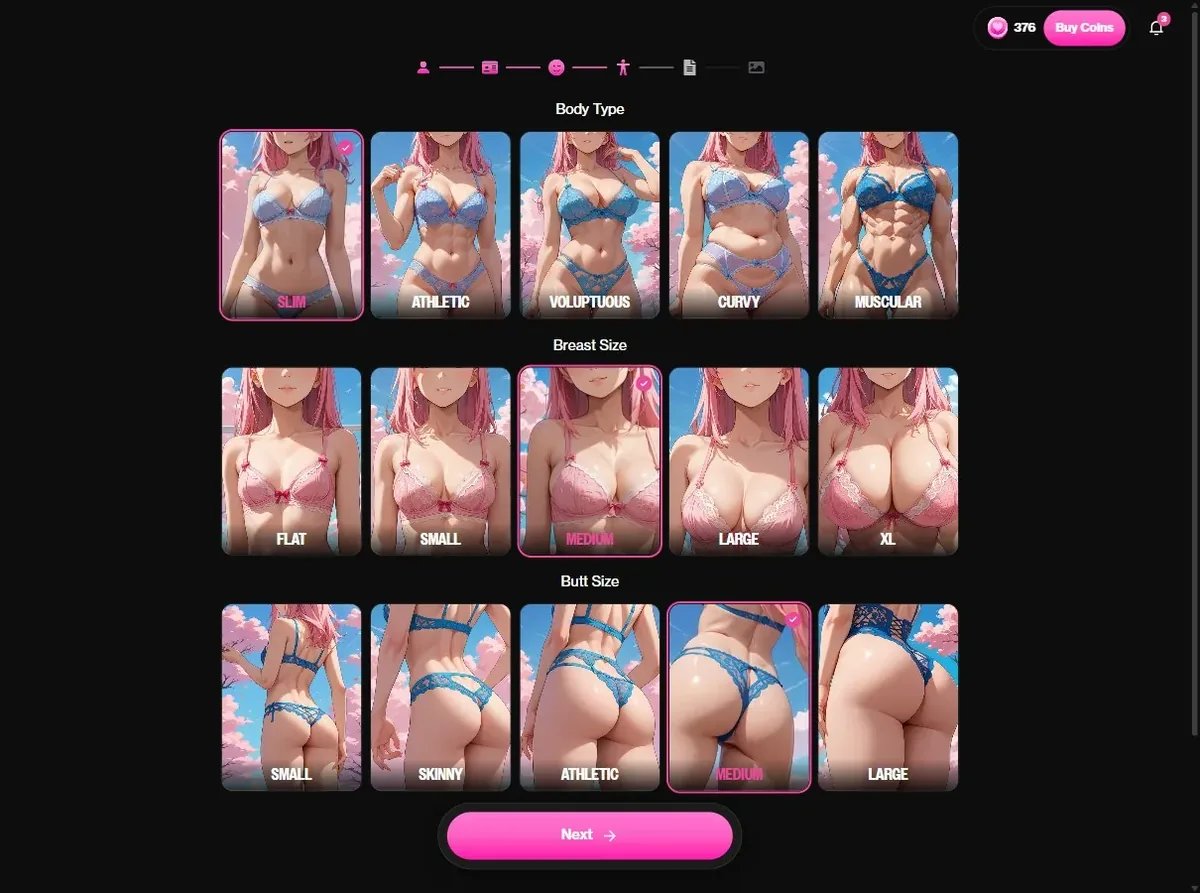
Body sets the body type (Slim, Athletic, Voluptuous, Curvy, Muscular), then breast size and butt size, each with a drawn preview. Some previews are suggestive, and they stay covered.
Choose what fits the character rather than the extremes: a knight-captain reads better Athletic, a gentle librarian Slim or Curvy. The silhouette shows in every picture you will ask for later, so it is worth a second look.
Tip: if you are building a muscular amazon or a warrior, Muscular plus the Athletic proportions gives the most convincing result.
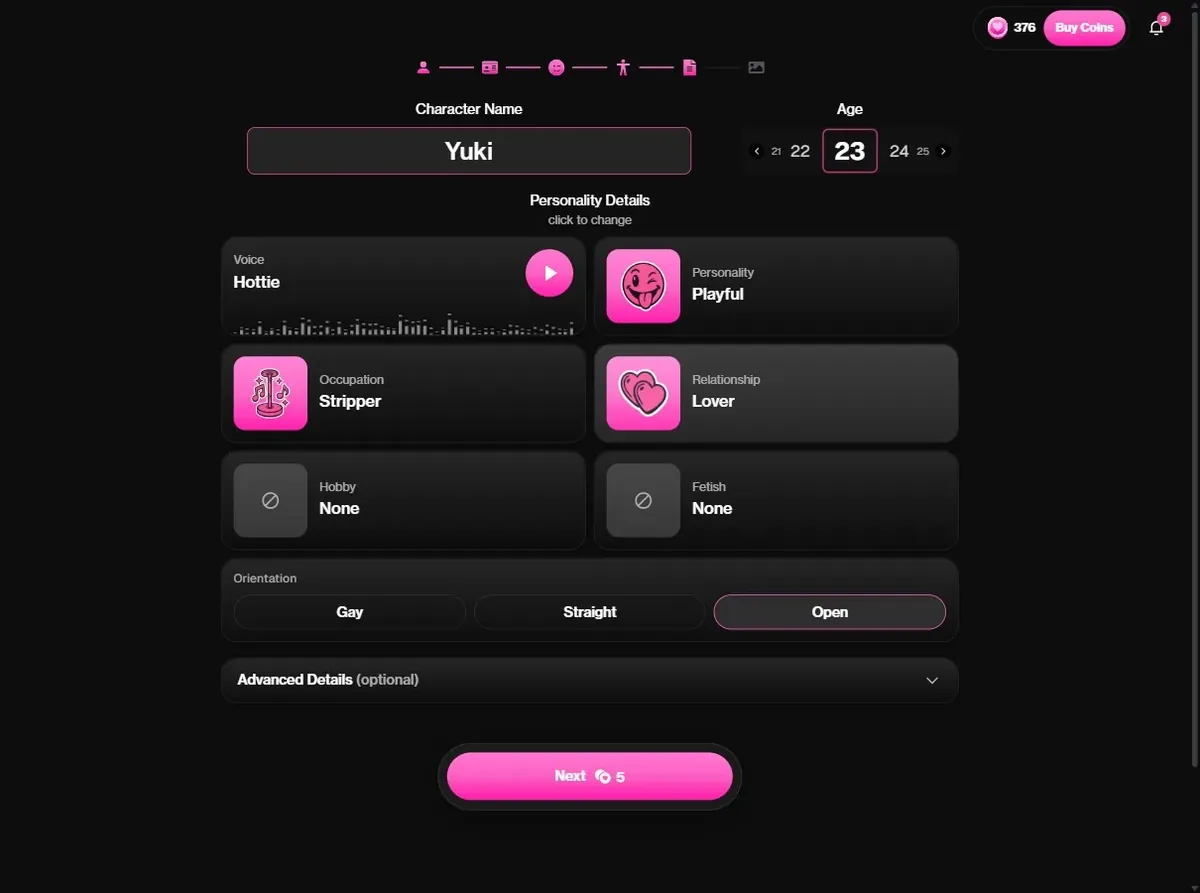
Details is where she becomes someone. Type a name, set her age (the selector starts at 21), then pick from lists: a voice with a preview button, a personality, an occupation, a relationship to you, a hobby and an orientation. Advanced Details opens a free text field; the custom prompt there is a Premium feature.
The lists are long, more than a hundred occupations and dozens of personalities, so most archetypes can be built without typing. For more control, write two or three lines in Advanced Details: where she lives, what she wants, how she talks. The Next button shows the price of the portrait, 5 coins, before you spend anything.
Tip: a short backstory changes her first messages more than any setting. One sentence about where you meet is enough.
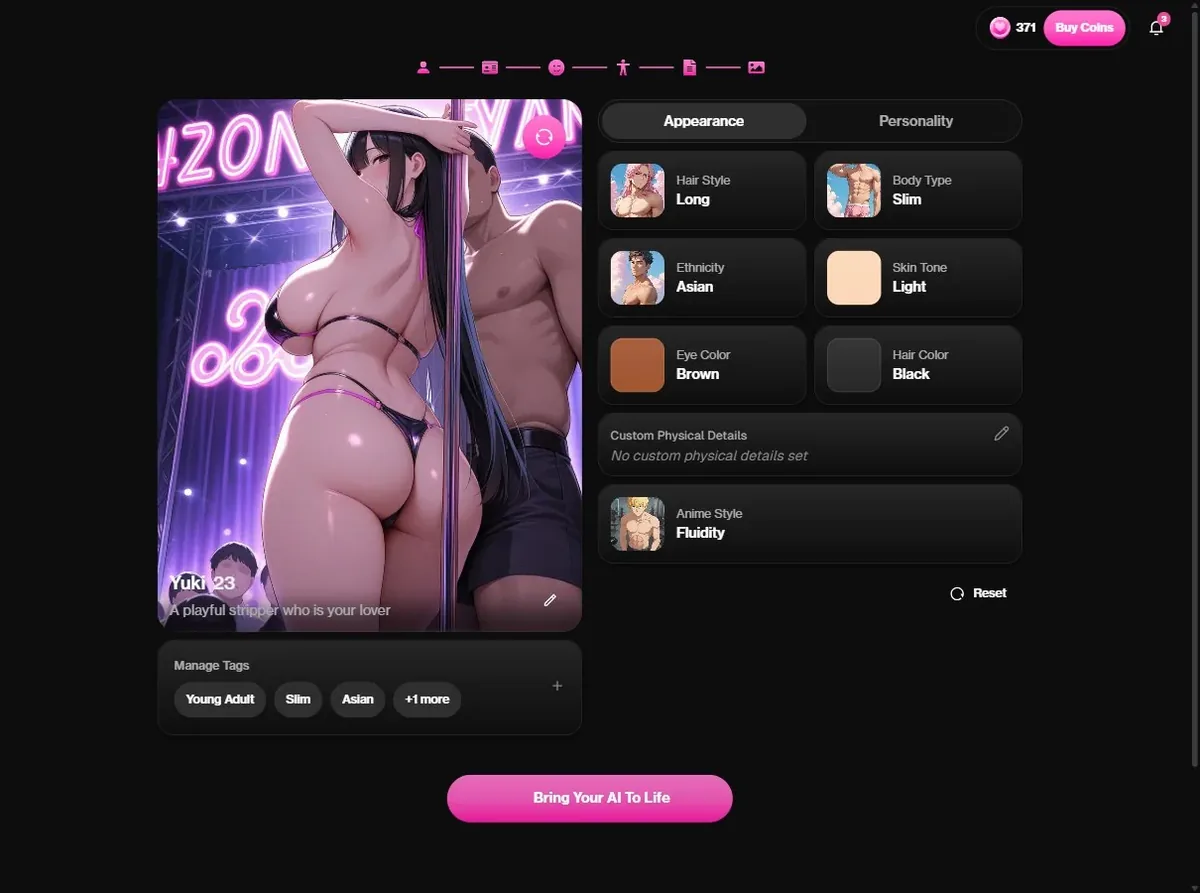
Press Next. On a free account, this is when OurDream asks you to sign up, after a quick human check. Then the Image step renders her portrait next to a summary of her appearance and personality, with an Anime style setting and a Regenerate button.
Our Yuki came out as a polished anime illustration that matched every choice. If the first portrait misses, use Regenerate before you go further. When it looks right, press Bring Your AI To Life: she is saved in My AI and her chat opens. The portrait used 5 coins of our balance; nothing else in the builder costs coins.
Tip: the portrait becomes the reference face for later pictures, so it is worth one regeneration if the face is not quite right.
 Open the OurDream builder
OurDream confirms the creation with a card: You've created a new character, with two buttons, Generate and Chat. She is also listed in My AI, where you will find her later next to any other character you build.
Start with a message that gives her something to react to. A place and a reason work best: you meet in her studio, you bring back a book she lent you, you are late for a game night. In our chat, Yuki picked up on a rainy afternoon, tea and an anime to watch, and kept those details for the rest of the conversation.
The chat panel lets you change the Model, the Writing style, the Voice and the Memory, and add Members for a group scene. On Premium, messages cost nothing, so you can play long scenes. Pictures use the Generate button or the image request in the chat and cost coins; video and voice calls cost more. Premium's 1,000 monthly coins cover about 10 videos or 20 minutes of calls.
If you want a second character, build her the same way: a free account keeps up to 10. If you like one of them a lot, Premium lets you publish her so other users can chat with her too.
Exact builder settings, then one line for Advanced Details.
Building is free except the portrait: 5 coins out of the 55 you get at sign-up. On a free account, each message then costs 1 coin. Premium costs $19.99 a month, or $9.99 a month billed $119.88 a year, and includes 1,000 dreamcoins a month; messages cost nothing. Extra coins come in packs: 1,000 for $11.99, 5,000 for $49.99. Deluxe adds 5,000 coins a month and more memory for heavy users.
| What | Cost |
|---|---|
| Signing up | Free, 55 dreamcoins |
| Her portrait | 5 dreamcoins |
| A message on a free account | 1 dreamcoin |
| A message on Premium | 0 coins |
| Premium yearly | $9.99 a month ($119.88 a year) |
| Premium monthly | $19.99 |
| Coin packs | 1,000 for $11.99, 5,000 for $49.99 |

Written by
Wren Ashby @wrenashby
Anime fan from the Pacific Northwest who has spent the last couple of years testing AI girlfriend apps. Builds a character on every platform before writing a word about it.
How we testYes. You can click through all six steps and create a character on a free account. The portrait costs 5 of the 55 dreamcoins you get at sign-up.
Only at the end. The first five steps work as a guest; signing up, free and without a card, renders her portrait and opens the chat.
Yes. Elf, Alien and Demon are options on the ethnicity step, next to Custom for anything else, such as cat ears or a fox tail.
A free account can keep up to 10 characters, each one costing 5 coins for her portrait. On Premium your monthly coins cover many more portraits.
The age selector starts at 21. Every character on this site is a fictional adult.
On a free account, 1 coin per message. On Premium, messages cost 0 coins; coins only go to pictures, videos and calls.
Your character is six screens away. Start with the Anime card on OurDream.
Open the OurDream builderTry OurDream free, 55 coins included
Our number one pick gives you 55 coins at sign-up, no card needed. Build your own anime girlfriend in six steps.
Open OurDream